| Home |
| Security |
| Publications |
| Links |
| About Site |
Protecting Yourself Online:
Part 2
The personal firewall is finally installed. Choosing the right firewall was difficult, but well worth the effort. The computer effectively has locks on the door and an alarm system. Great! Now what? Is the computer safe now? Yes and No. There are many dangers on the Internet. If, like many users, you only visit commercial sites of good repute then you will do just fine. On the other hand, if you are a little more adventurous and venture off the beaten path online, than there are a few precautions that should be taken into consideration. The most critical component, besides the firewall, is your web browser.
Today, with the astronomical adoption of the web browser as the window to information, more and more vulnerabilities are discovered in Web browsers almost on a daily basis. What to do? At a minimum, its a good practice to keep your web browser up to date on the most critical security issues. In Internet Explorer, it is a very straight forward process to update your browser. You do not have to be a computer geek to update your browser either.
| To update your browser, Start Your Internet Explore and Goto Tools > Windows Update. | 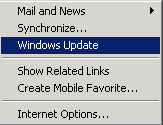 |
The Microsoft Windows Update Web Site will ask you to confirm an ActiveX Control, say yes to continue. The ActiveX control will determine which components your web browser needs. The most important update, and the one you need to concern yourself with the most, is the critical update. Note: these updates may take a while to download or a regular modem.
So your browser is now updated huh?! Feeling safe yet? You should. With a firewall in place and your browser up to date, life is good in the virtual highways. Just remember that if you venture off the beaten path, never accept ActiveX controls from unknown web sites. Even with all this security in place, if you grant a sites ActiveX control access on your machine, its the equivalent of handing someone the keys to your house. Why spend all the effort to install locks if you are going to hand over the keys?
Be a conscientious web surfer. Do not accept every ActiveX control under the Sun. Try to treat each web site visit, like a visit to a strangers house. Would you accept a pain killer, or headache medicine from a stranger? Of course not1!! If you are the type of person that would accept drugs from strangers than you should change the security settings in Internet Explorer further.
| Goto Tools > Internet Options.
Click on the Security Tab and raise the bar where it says "Security level for this Zone. |
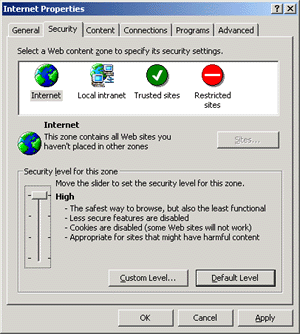 |
This is the functional equivalent to shutting your mouth and not being physically capable of taking anything from a stranger. Who else should have this setting? Anyone who will be venturing to the darker sites on the net, i.e hacking web sites.
Users are advised to raise their security settings before entering these sites. I hope this article has helped some of you out there. If you are a computer geek you probably won't get much out of this article, please visit one of the many other more technical sites linked from www.ortizonline.com.
By: Efrain Ortiz,Jr.August 2000
Comments? Questions? Rants? Raves?number6 at ortizonline dot com
|
|
|
|
|
|
|